Loading and saving
- The first thing you will need to learn is how to load the example file. To do this, open up the file menu, as shown, and click on "Load":
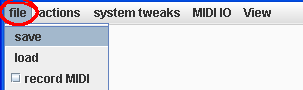
- A file dialog will pop up and you will can select the file "demo1.lem". Demo one will work with standard general MIDI. If you have reason 2.5 installed, you can use the reasonDemo.rns file that comes with this distribution and load the reasonDemo.lem file into lemu2. Its way better than the GM demo of course.
- After you have made changes you can click save and save it in a similar way. It doesn't matter if you don't put '.lem' when you are saving, it will do it automatically.
- Note: loading and saving deals with patterns and morphers but MIDI IO must be saved separately at the moment.