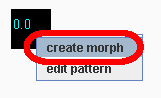
To create a morph between two patterns, simple right-click on one of the patterns and select "create morph" from the popup menu:
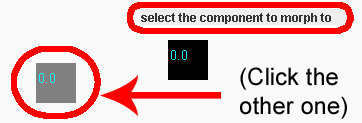
Then, you will be asked to click on the pattern that you want to morph to. You can click on another pattern or create a new one and click on it:
After clicking on the other pattern, a morph should be create that looks like this:
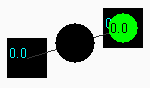
The green ball is the current location of the morph. To hear the morph, simply click on the black ball that is suspended in between the two patterns.